> For the complete documentation index, see [llms.txt](https://help.cube.mo/llms.txt). Markdown versions of documentation pages are available by appending `.md` to page URLs; this page is available as [Markdown](https://help.cube.mo/kai-dian-zhi-nan/wang-zhan-she-zhi/dian-pu-she-zhi/di-san-fang-gong-ju-she-zhi.md).

# 第三方工具設置

### 🔧 第三方工具設置

***

<figure><img src="/files/n3rH6hqS8GQSC9NTchq9" alt=""><figcaption></figcaption></figure>

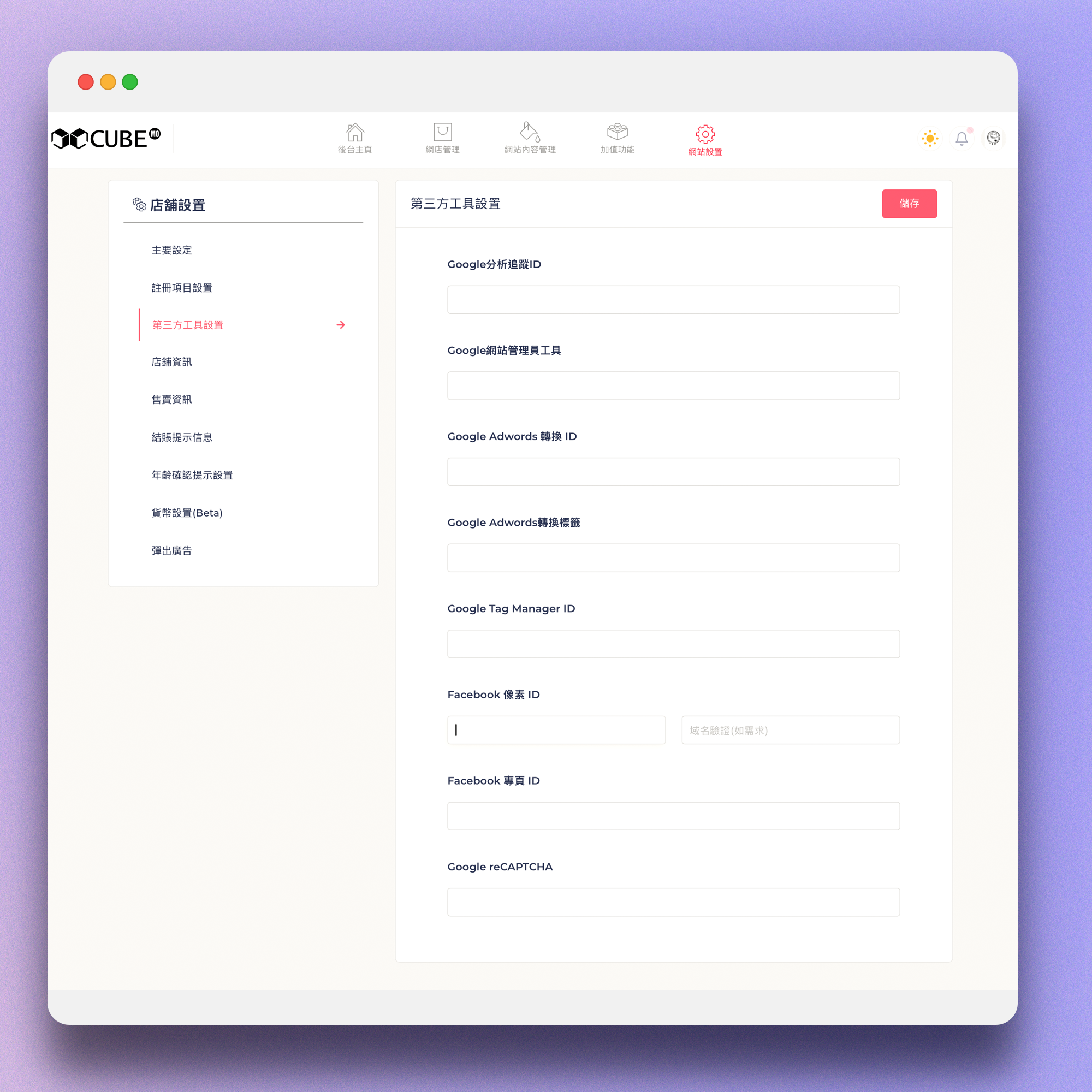
#### 📊 Google 分析追蹤 ID（Google Analytics）

請輸入格式如：`UA-XXXXXXXXX-X` 或 `G-XXXXXXXXXX`（依版本而定）📌 用途：追蹤網店流量、用戶行為、轉化率等數據，幫助您了解訪客來源和購買路徑。\
🔗 取得方式：登入 analytics.google.com → 選擇資產 → 管理 → 資產設定，即可查看追蹤 ID。

***

#### 🔍 Google 網站管理員工具（Google Search Console）

請輸入驗證代碼（meta 標籤或 HTML 檔案驗證）📌 用途：驗證您對網店的擁有權，並監控網店在 Google 搜尋中的設置情況、搜尋表現及索引狀態。\
🔗 取得方式：登入 search.google.com/search-console → 新增資產 → 選擇驗證方式（建議選「 HTML 標籤」方式）→ 複製驗證代碼內容属性値內的字符串。

***

#### 💰 Google Adwords 轉換 ID

填寫轉換追蹤 ID，例如：`AW-XXXXXXXXX`📌 用途：用於追蹤 Google 廣告的轉化成效，了解哪些廣告導致了實際購買。\
🔗 取得方式：登入 Google Ads 後台 → 工具 → 轉化目標 → 選擇轉化操作，即可看到格式為 AW-XXXXXXXXX 的轉化 ID。

***

#### 🏷️ Google Adwords 轉換標籤

此欄位輸入 Google 提供的「轉換標籤內容」，通常是一段 `<script>` 程式碼。📌 用途：追蹤特定轉化行為（如購買、填寫表單）的詳細代碼，必須與轉化 ID 配合使用。\
🔗 取得方式：在 Google Ads 同一轉化操作頁面中，點擊「標籤設定」，將完整 script 代碼貼入此欄位。

***

#### 🧩 Google Tag Manager ID

輸入格式如：`GTM-XXXXXXX`📌 用途：透過單一平台第三方追蹤代碼（包括 Analytics、Ads、Pixel 等），適合需要管理多個追蹆工具的商家使用。\
🔗 取得方式：登入 tagmanager.google.com → 選擇容器 → 在頁面左上角可看到 GTM-XXXXXXX 格式的容器 ID。

***

#### 📘 Facebook 像素 ID

輸入 Facebook Pixel 代碼，例如：`123456789012345`📌 用途：追蹤網店訪客的 Facebook 廣告展示及轉化行為，可用於再行銷和及廣告成效分析。\
🔗 取得方式：登入 Meta Business Suite → 事件管理工具 → 資料來源 → 像素，即可查看您的像素 ID（純數字）。

***

#### 🏠 Facebook 專頁 ID

輸入您的 Facebook 專頁代碼，用於串接留言或 Messenger。📌 用途：將 Facebook 專頁與網店连接，讓訪客可透過網店的 Messenger 按鈕直接與您專頁聯繫、發訊或留言。\
🔗 取得方式：進入您的 Facebook 專頁 → 點擊頁面名稱下方的「關於」頁籤 → 專頁透明度 → 專頁 ID（即為您需要輸入的代碼）。

***

#### 🔒 Google reCAPTCHA

開啓後需填寫：

📌 用途：防止機器人、垃圾註冊及惡意表單提交，保護網店安全。 🔗 取得方式：登入 google.com/recaptcha/admin → 建立新網址 → 選擇 reCAPTCHA v2 或 v3 → 填入網店域名 → 提交後即可取得 Site Key 與 Secret Key。

{% hint style="info" %}
[Google reCAPTCHA影片教學](https://youtu.be/aQLMWLfpmuk)
{% endhint %}

✅ 如何設定：

1. 將提供的 Site Key 貧入「 Site Key 」欄位
2. 將提供的 Secret Key 貧入「 Secret Key 」欄位
3. 儲存後，網店表單頁面將自動顯示 reCAPTCHA 驗證


---

# Agent Instructions
This documentation is published with GitBook. GitBook is the documentation platform designed so that both humans and AI agents can read, navigate, and reason over technical content effectively. Learn more at gitbook.com.

## Querying This Documentation
If you need additional information that is not directly available in this page, you can query the documentation dynamically by asking a question.

Perform an HTTP GET request on the current page URL with the `ask` query parameter, and the optional `goal` query parameter:

```
GET https://help.cube.mo/kai-dian-zhi-nan/wang-zhan-she-zhi/dian-pu-she-zhi/di-san-fang-gong-ju-she-zhi.md?ask=<question>&goal=<endgoal>
```

`ask` is the immediate question: it should be specific, self-contained, and written in natural language.
`goal` is optional and describes the broader end goal you are ultimately trying to accomplish on behalf of the user. GitBook uses it to tailor the answer towards what is most useful for that goal.

The response will contain a direct answer to the question and relevant excerpts and sources from the documentation.

Use this mechanism when the answer is not explicitly present in the current page, you need clarification or additional context, or you want to retrieve related documentation sections.